

I use AI image generators almost every day. Depending on what I am working on, I may create anywhere from 50 to 100 images in a single day. Some are made for blog articles, others for social media, creative experiments, or projects such as Cozy Space Place.
With that kind of volume, I notice fairly quickly when a generator understands what I want—and when it makes me fight for it.
I want to be transparent from the beginning: Kre8or AI is not the only image generator I use. Different platforms have different strengths, and I am willing to move between them when a project calls for it. However, when I need an image to follow my idea closely, especially without building an enormous prompt, I usually find myself returning to Kre8or.
That is where it has provided the most value for me: pinpoint accuracy with fewer failed attempts.
I am a paying Kre8or AI Creator-plan member and an affiliate. If you join through one of my links, I may earn a commission at no additional cost to you. My opinions are based on my experience as an initial beta tester and active user.
Why Do I Use Kre8or AI?
I use Kre8or AI because it often turns a short, natural prompt into a usable image without several failed attempts. I still use other generators, but I return to Kre8or when accuracy matters and I want the result to stay close to the idea in my head.
My History With Kre8or AI
My experience with Kre8or began before the platform was released to the public. I was one of its initial beta testers, which gave me a firsthand look at the work going into the platform while it was still being developed.
Beta testers were given AI credits so we could create images, explore the features, and see where the platform succeeded or needed improvement. Those credits were intended to let us test Kre8or properly without immediately paying for a subscription.
There was just one problem in my case: I create a lot of images.
Because I regularly produce 50 to 100 images per day across different projects, I went through my gifted testing credits in only a few days. At that point, upgrading was not a difficult decision. I was already using the platform heavily enough to understand what it could do for me.
To the best of my knowledge, I became Kre8or’s first paying member.
I did not subscribe because someone handed me a prepared review or asked me to promote something I had barely used. I subscribed because I had already tested it, exhausted my credits, and wanted to continue creating with it.
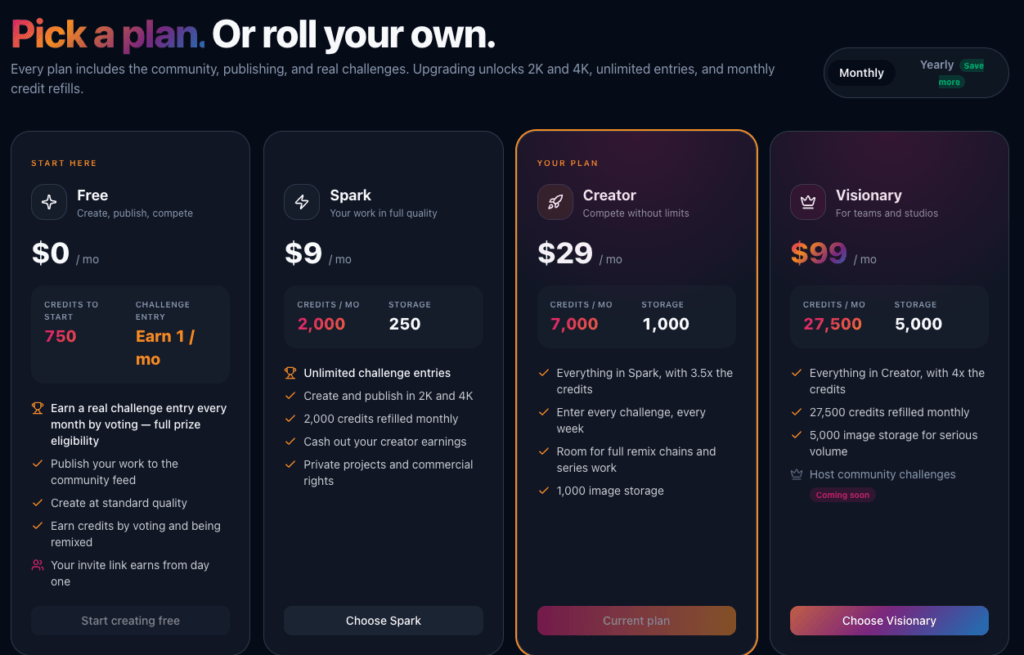
I currently pay for the Creator plan, which costs $29 per month at the time of writing. I plan to remain a paying customer because Kre8or continues to have practical value in my daily creative work.
Transparency note: I am a paying Kre8or AI customer, and this article contains my affiliate link. If you join through that link, I may earn a commission at no additional cost to you. My opinions come from my own experience as an early beta tester and active user.
The First Prompt That Shocked Me
My first serious Kre8or test was not a carefully written image prompt. I did not describe a landmark, architectural style, camera angle, weather condition, or time of day.
This was the entire prompt:
38.889463° N latitude and -77.035237° W longitude
That was it.
Kre8or interpreted those coordinates and generated a recognizable image of the Washington Monument and the surrounding National Mall.

I expected the platform to give me something generic, misunderstand the numbers, or perhaps produce an unrelated landscape. Instead, it recognized what the coordinates represented and built an image around the correct location.
The resulting image was still AI-generated, of course. It should not be mistaken for a geographically exact photograph, and some details were creatively interpreted. What surprised me was that I never told Kre8or what the location was. I only supplied the coordinates.
That first experiment told me something important about the platform: it could understand more than a long list of visual instructions. It could take a minimal, somewhat unconventional prompt and work out what I was asking it to create.
How I Use Kre8or for Cozy Space Place
Cozy Space Place depends heavily on atmosphere. A room can contain a fireplace, sofa, blanket, and lamp yet still fail to feel cozy. The lighting, textures, arrangement, and small lived-in details all have to work together.
On some image platforms, producing that atmosphere requires a long prompt with several layers of instructions. I may have to describe the architecture, furniture, lighting temperature, camera style, decorative details, composition, realism, and everything I do not want included.
Kre8or often lets me begin with something much simpler.
For example, I entered this prompt:
One Short Prompt, One Usable Result
“evening photograph of a cozy log cabin living room illuminated by several warm light sources”
The first result included the log construction, stone fireplace, layered lighting, books, blankets, comfortable seating, and the lived-in atmosphere I wanted.
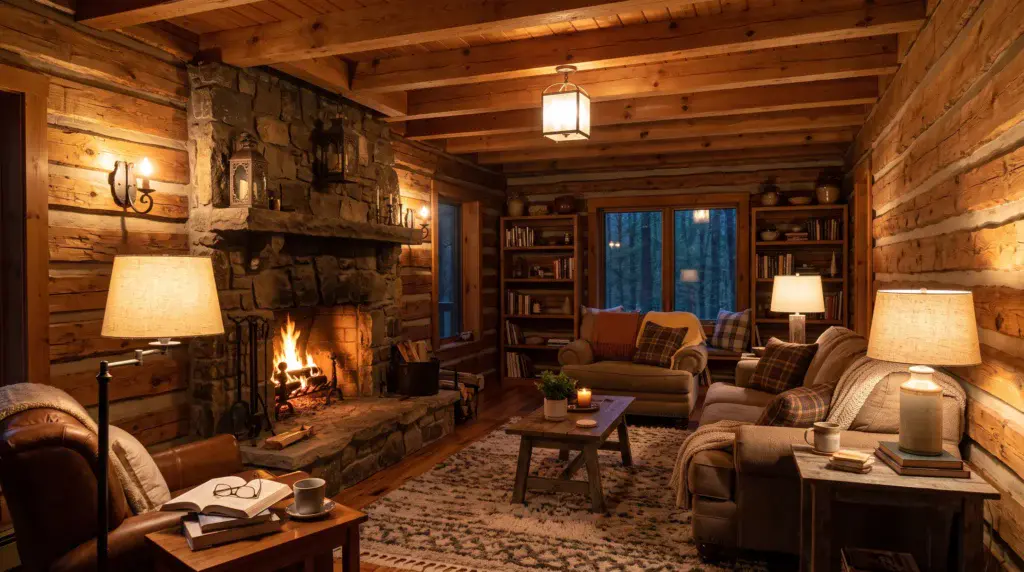
The first generation gave me a warmly lit log cabin living room with a stone fireplace, layered table lamps, wooden beams, comfortable seating, bookshelves, blankets, an area rug, and a dark forest visible through the windows.
It understood that “several warm light sources” meant more than turning every part of the room orange. The image included a fireplace, wall lighting, overhead lighting, and multiple lamps, creating the layered atmosphere I was looking for.
That image was usable on the first attempt.
I did not revise the prompt. I did not generate several alternatives and select the least problematic one. I did not take the image to another program to repair or enhance it. The result came directly from that one short prompt with no further edits.
For someone creating as many images as I do, that matters. A failed generation does not only waste a few credits. It interrupts the creative process. If I spend too much time repairing prompts or repeatedly explaining the same idea, I am no longer concentrating on the project itself.
Why Shorter Prompts Matter to Me
There is nothing wrong with detailed prompting. I use detailed prompts when I need precise control over a complicated scene, and sometimes the process is enjoyable. A long prompt can help define the composition, mood, lens, textures, and dozens of other small decisions.
But I do not believe every good image should require a paragraph of technical instructions.
Sometimes I know exactly what I want visually, yet I want to express it in a normal sentence. Kre8or is particularly useful when I want to start with the idea itself and let the generator understand the surrounding details.
That does not mean every prompt produces a perfect image. No AI image generator can honestly promise that. It means I tend to get more usable results from fewer attempts, and that makes a noticeable difference when I am working at high volume.
Other generators sometimes make me feel as though I am writing instructions for the machine. With Kre8or, I can more often describe the image I want.
It is a subtle difference, perhaps, but it changes the way I create.
I Still Use Other Image Generators
I do not want to suggest that Kre8or has replaced every other platform in my workflow. It has not.
I use other image generators, and I will continue using them. One may be better suited to a particular artistic style, editing task, unusual composition, or experimental idea. Sometimes I simply want to see how different generators interpret the same concept.
Kre8or Is Not the Only Generator I Use
I use other AI image generators and will continue using them. Different tools can be better suited to different styles, editing tasks, or creative experiments.
I return to Kre8or when I need pinpoint accuracy, fewer failed attempts, and an image that stays close to what I originally imagined.
Still, when accuracy matters and I want the output to stay close to my original idea, Kre8or is where I tend to return.
That is especially true when I am tired of failed generations or do not want to construct a complicated, multilayered prompt. My experience has been that Kre8or often understands the central idea earlier in the process.
I think that is a fairer recommendation than pretending one generator is automatically the best at everything. Creative tools do not have to be used exclusively to be valuable.
The Community Makes Images Feel Less Finished
Another part of Kre8or that I enjoy is sharing my work with its creative community.
When I publish an image, other members can use the remix feature to reimagine it. They might change the atmosphere, subject, style, colors, or composition. The new creation can move in a completely different direction while still beginning with the original idea.
I invite people to remix my work because I enjoy seeing what they notice that I did not.
In fact, other creators have taken images I made and produced versions that I thought were better than my originals. I do not see that as someone taking away from my creation. It shows me what else the idea could become.
An Image Can Become the Beginning of Another Idea
I share my creations with the Kre8or community and invite other members to remix them. A creator can change the style, atmosphere, subject, or composition and turn my original into something completely new.
It has happened more than once: someone remixed one of my images and created a version I thought was even better. I enjoy that exchange because it shows me possibilities I may not have considered on my own.
Creating can be strangely solitary, even when the final image is eventually shared online. Kre8or’s remix system introduces a collaborative element. An image does not necessarily end when I publish it. It can become the beginning of someone else’s idea, which may then inspire another variation.
That creative back-and-forth is one reason the platform feels different from a basic prompt box that simply delivers an image and sends you on your way.
The Credit Limitation Is Worth Understanding
The Credits Are Limited
Kre8or provides enough starting credits to test the generator, but frequent creators may use them quickly. That happened to me because I regularly create 50–100 images per day across several projects.
Kre8or is not without limitations, and its credit system is the most obvious one for heavy users.
New users receive a generous number of credits to test the platform before deciding whether it fits their needs. That gives you an opportunity to explore the generator and community without immediately committing to a paid plan.
However, the credits are limited. If you create frequently, you may use them faster than expected and eventually need to upgrade for more.
That is exactly what happened to me.
At the time of writing, the Creator plan costs $29 per month and includes 7,000 monthly credits, along with additional storage and platform benefits. Plans, prices, and credit allowances can change, so I recommend checking the current details before subscribing.
For an occasional creator, the free credits may provide plenty of time to decide whether Kre8or is a good match. For someone producing images at my pace, paying for a larger allowance made sense fairly quickly.
I would rather be upfront about that than describe the platform as unlimited or free. It gives you room to test it, but serious or high-volume use will probably lead you toward a paid plan.
Who I Think Kre8or Is Best For
Based on my experience, Kre8or is worth trying if you have a clear image in your mind but do not want to become a professional prompt writer before you can create it.
It may be particularly useful for:
Kre8or May Be Worth Testing If You Are…
You may still need to refine some prompts. You may also find that another generator is better for a particular style or task. That is normal. The real question is not whether Kre8or can replace every creative tool you use.
The better question is whether it helps you turn more of your ideas into usable images with less friction.
For me, it does.
Why I Continue Paying for Kre8or
My opinion of Kre8or was not formed from a quick free trial. I watched the platform take shape as an early beta tester. I used the credits I was given, ran through them because of my normal creative workload, and then chose to pay for continued access.
I have seen Kre8or interpret nothing more than geographic coordinates and create a recognizable location. I have also watched it turn a short sentence about a warmly lit cabin into an image that fit Cozy Space Place on the first attempt without editing.
Those experiences are why I continue using it.
Kre8or is not the only generator in my toolbox, and I do not think it needs to be. It is the one I often return to when I want fewer failed attempts, a simpler prompt, and an image that stays closer to what I actually imagined.
If you would like to see whether it fits your own creative process, you can begin with the available testing credits before deciding whether to upgrade.
See What Kre8or Makes From Your Idea
My experience may not be identical to yours, which is why I recommend using the available testing credits before choosing a paid plan. Start with a simple idea, see how closely the result matches it, and decide whether Kre8or fits your creative process.
Try Kre8or AI Affiliate link: I may earn a commission if you join, at no additional cost to you.
Great walkthrough! I like how you explained your process step by step instead of just showing the final results. AI image tools can feel overwhelming at first, so sharing practical tips and real examples makes them much more approachable. It’s encouraging to see how creativity and AI can work together to produce unique visuals while still leaving room for personal input. Thanks for sharing your experience!
I appreciate you taking the time to leave behind some remarks and insights. Kre8or is an awesome platform. The easy of use and quality of work it provides is beyond outstanding. The platform is a must see and it will speak for itself.
Did you say you create 50–100 images daily? Wow, that’s impressive! I’ve read a couple of reviews about Kre8or but haven’t actually tested the platform myself yet, so hearing how it handles short prompts so well is really encouraging. The images you shared look great, especially considering you didn’t have to spend time writing long, layered instructions.
I’m curious: on your Creator plan, with 7,000 credits a month, how many images does that realistically let you generate before you need to top up or upgrade?
To share, each image cost 100 to generate. So 7k will allow you to create 70 images. You can also create lower quality at half the cost, but you will need to enhance them to share with the creator community. The lower quality images are nothing to scoff at. They are still better than most AI Image generators out there.
And yes, I create 50-100 daily!
I never signed up to try the beta version, as I am quite happy with the images I get within the Wealthy Affiliate platform for my purposes. I don’t create as many images as you though. Congratulations on becoming the first paid member. I am amazed that you only had to give co-ordinates to get that image so I understand why you upgraded. I also like the fact that you can share the images for others to remix, so imagine the amazing images being generated on this platform.
Kre8or is a creature that stands by itself. the community environment is and added benefit. You should at the very least sign up and experience the platform even if you do not upgrade to a paid membership. It is something to be seen and felt.