

When people ask whether an AI image generator produces “good quality,” they are often talking about resolution. Can it create a large image? Does it offer 2K or 4K output? Will the finished file look sharp on a website?
Those things matter, but image quality goes deeper than pixel dimensions.
For the work I create on Cozy Space Place, a high-quality image also needs believable lighting, realistic textures, a balanced composition, and close attention to the original prompt. A technically sharp image is not particularly useful if the furniture looks distorted, the lighting makes no sense, or the finished room feels nothing like the one I described.
After using Kre8or AI since its initial beta period, I have found its biggest image-quality advantage is not simply sharpness. It is how often I receive a usable image without going through several failed generations first.
That does not mean every result is perfect. I still inspect what it creates, and I continue using other image generators for certain projects. However, when I need the image to follow my original idea closely, Kre8or is often where I return.
I am a paying Kre8or AI Creator-plan member and an affiliate. If you join through one of my links, I may earn a commission at no additional cost to you. My opinions are based on my experience as an initial beta tester and active user.
Is Kre8or AI Image Quality Good?
In my experience, Kre8or AI produces image quality that is strong enough for blog articles, featured images, and social content. Its real advantage is not only sharpness. It often follows my prompts closely and gives me a usable composition without several failed generations.
What Image Quality Means to Me
I create approximately 50 to 100 images per day across different projects. Some are intended for blog posts, while others are made for social media, experiments, or future content ideas.
At that volume, I cannot judge quality only by whether an image looks impressive for a few seconds. It has to be usable.
These are the qualities I pay the most attention to:
- How accurately the image follows my prompt
- Whether the lighting looks natural within the scene
- How believable the materials and textures appear
- Whether furniture and architectural details make sense
- How well the composition guides the viewer’s eye
- Whether the image works at its intended size and aspect ratio
- How much editing or regeneration is required afterward
What I Look for Before Calling an Image Usable
Does the finished image actually match what I requested?
Do the highlights, shadows, lamps, and windows work together?
Do wood, stone, fabric, glass, and metal look like different materials?
Are the furniture, architecture, reflections, and small objects formed correctly?
Does the layout remain readable as a featured image or social thumbnail?
Can I use the result without repeated generations or extensive editing?
That final point is easy to overlook. If I generate ten attractive images but only one follows the prompt, the generator may be visually impressive without being efficient.
For me, usable quality includes accuracy.
Kre8or Often Understands Simple Prompts
One reason I keep returning to Kre8or is that I do not always need to write a long, technical prompt to get the result I want.
For a Cozy Space Place image, I entered this single sentence:
That was the complete prompt.
A Usable Image on the First Generation
“evening photograph of a cozy log cabin living room illuminated by several warm light sources”
Kre8or included the log construction, stone fireplace, layered lighting, books, blankets, comfortable furniture, and the evening atmosphere I wanted.
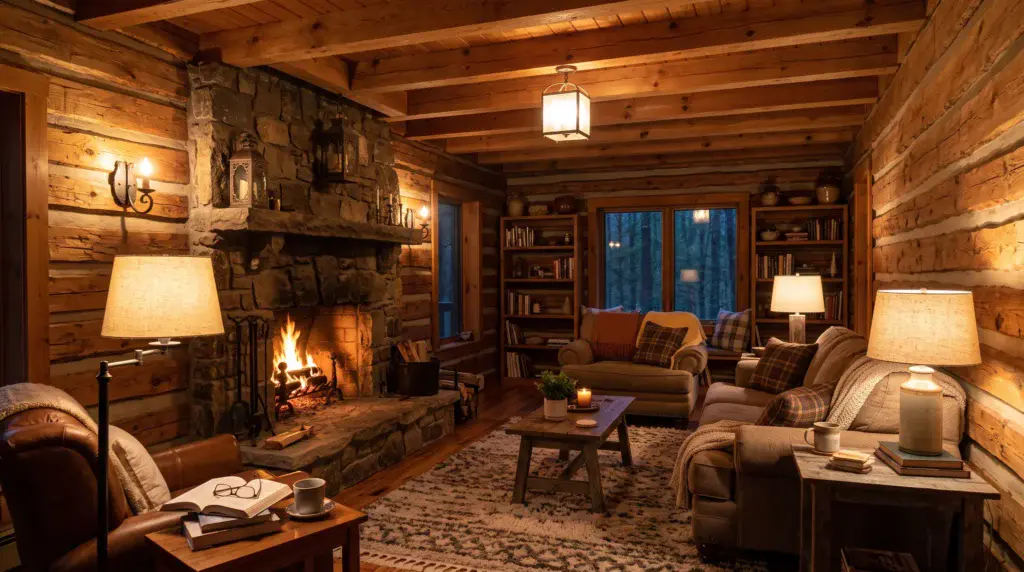
Kre8or created a warm log cabin interior with a stone fireplace, exposed wood, comfortable seating, books, blankets, an area rug, and several distinct sources of light. The dark blue view through the windows also helped establish that the scene was taking place during the evening.
More importantly, I received that image on the first generation.
I did not rewrite the prompt, ask for multiple variations, or edit the finished result. It was ready to use as it was.
This example matters because almost any generator can occasionally produce a beautiful room when given enough instructions and attempts. What impressed me was how much Kre8or understood from one natural sentence.
If you would like to see more about that test and my history with the platform, I explain it in How I Use Kre8or AI to Create Images.
Lighting Is One of Its Stronger Qualities
Lighting can make or break a cozy interior image.
A room does not automatically feel inviting because everything has been tinted orange. Real rooms usually contain several kinds of light at once. A fireplace has a different glow than a shaded lamp, while evening light entering through a window should be cooler than the light inside the room.
In my cabin test, Kre8or handled this contrast particularly well. The fire, lamps, and fixtures created warm pools of light without completely flattening the scene. The windows introduced cooler blue tones, making the interior warmth feel more believable.
This is the kind of detail I look for when creating images for Cozy Space Place. Warmth should come from the interaction of light, material, and shadow—not from applying one color across the entire image.
I still check every result for lamps that appear to glow without a reason, inconsistent shadows, and overexposed fixtures. AI generators occasionally struggle with those details. In this case, though, the lighting was one reason the first result was immediately usable.
Warmth Came From More Than an Orange Tint
The fireplace, lamps, and interior fixtures created separate pools of warm light, while the cooler blue view through the windows established the evening setting. Wood, stone, upholstery, blankets, and the rug also retained visibly different textures.
That combination helped the room feel lived in rather than artificially staged.
Textures Help the Rooms Feel Lived In
A cozy space depends heavily on texture.
Wood grain, stone, woven blankets, upholstered furniture, books, rugs, and ceramics should not all appear to have the same smooth, artificial surface. Each material needs its own visual weight.
Kre8or’s cabin image separated those materials well. The stone fireplace appeared rough and substantial. The log walls showed grain and variation. The upholstery looked soft, while the blankets, rug, and wooden furniture added different layers to the scene.
Those details helped the room feel inhabited rather than digitally staged.
I do not want Cozy Space Place images to look like empty furniture showrooms. I prefer rooms with books on a table, blankets within reach, slightly imperfect arrangements, and enough personal detail to suggest that someone could actually relax there.
Kre8or has generally responded well when I include that kind of atmosphere in a prompt, even when I describe it with relatively few words.
Composition Matters as Much as Detail
An AI image can contain beautiful individual objects and still feel awkward as a whole.
For a wide blog image, I want the main elements distributed naturally across the frame. The viewer should understand where to look first, but the image should also contain enough secondary detail to reward a longer look.
In the cabin image, the fireplace acted as the visual anchor. The furniture framed the room, while the coffee table, lamps, shelves, and windows added depth around it. The composition felt complete without becoming overly crowded.
That matters when I use an image as a featured visual or place it inside an article. A strong composition remains readable when it is reduced to a smaller size. It can also be cropped for different platforms without immediately losing the subject.
Kre8or currently advertises more than 25 visual styles, 10 aspect ratios, and renders up to 4K. Those options can help creators prepare images for blogs, social posts, vertical pins, and other formats without forcing one composition into every use. You can review the platform’s current capabilities on the official Kre8or website.
Resolution Is Only Part of the Story
Kre8or offers higher-resolution rendering on its paid plans, including 2K and 4K options. That can be helpful when I need a large featured image, want to preserve detail after resizing, or plan to crop part of a composition.
A 4K Image Is Not Automatically a Good Image
Higher resolution can preserve more texture and provide additional room for cropping, but it cannot repair a weak composition, malformed object, or result that missed the original prompt.
- Visible texture and fine detail
- Flexibility when cropping
- Appearance on larger displays
- Options for future reuse
- An inaccurate interpretation
- Awkward furniture or anatomy
- Illogical lighting and reflections
- A poorly balanced composition
Still, 4K does not automatically make an image good.
A higher resolution can make fabric texture, wood grain, and small decorative details look clearer. It can also make mistakes easier to see. A malformed object does not become more convincing simply because it contains more pixels.
My normal process is to judge the image itself before worrying about the largest available output:
- Does it match the prompt?
- Does the overall scene look believable?
- Are the important objects formed correctly?
- Does the composition fit its intended use?
- Would a higher-resolution render provide a meaningful benefit?
This saves me from spending additional credits on a larger version of an image that I would not use anyway.
The available resolutions and plan features can change, so I recommend checking Kre8or’s current membership information rather than relying on an older screenshot or review.
Where AI Image Quality Can Still Fall Short
Small Details Can Reveal an AI Mistake
Kre8or can produce a strong overall scene, but I still examine every image at full size. Complicated backgrounds and small objects create more opportunities for something unusual to slip through.
No AI image generator produces flawless results every time, and Kre8or is no exception.
Complicated scenes contain more opportunities for something to go wrong. Small background objects may be strangely formed. Text inside an image may not be readable. Reflections can become inconsistent, and people—particularly hands or crowded groups—deserve careful inspection.
Most of my Cozy Space Place images avoid identifiable people and readable text, which removes two common trouble areas. Even then, I look closely at:
- Chair and table legs
- Fireplace tools and railings
- Window frames and reflections
- Repeated lamps or decorations
- Books and small objects on shelves
- Furniture that appears to merge into a wall
- Textures that suddenly change direction
These problems are not unique to Kre8or. They are part of working with current AI image generation in general.
The difference, in my experience, is how often I can reach a usable starting point without repeatedly rebuilding the prompt. I may still need to regenerate a difficult concept, but I encounter fewer wasted attempts when Kre8or understands the central idea early.
Why Prompt Accuracy Affects Perceived Quality
One of my first Kre8or tests consisted of nothing but geographic coordinates:
38.889463° N latitude and -77.035237° W longitude
I did not name the city or landmark.

Kre8or interpreted the coordinates and generated a recognizable image of the Washington Monument and National Mall. It was an AI interpretation rather than a geographically exact photograph, but it understood what those numbers represented.
That experiment surprised me because accuracy begins before the image is rendered. The generator first has to understand what the user is asking for.
A beautifully rendered picture of the wrong subject is still a failed result.
The coordinate test and the cozy cabin prompt were very different, yet both showed me the same strength: Kre8or can sometimes extract a great deal of direction from very little information.
That ability is a major part of how I judge its image quality.
I Still Use Other Generators
I Do Not Use Kre8or Exclusively
I still use other AI image generators because different platforms have different strengths. Another generator may occasionally be better suited to a particular artistic style, editing task, or experiment.
I return to Kre8or when I need pinpoint accuracy, fewer failed attempts, and an image that remains close to the idea I originally described.
To be completely transparent, I use other AI image generators.
Sometimes another platform handles a certain artistic style better. Sometimes I want to compare interpretations or experiment with a different workflow. I do not believe that paying for one generator means I have to pretend every other option has no value.
Kre8or is the tool I tend to return to when I need pinpoint accuracy.
That may be an interior with specific lighting, an unusual concept that needs to remain recognizable, or a blog image I do not want to regenerate repeatedly. Its value to me comes from the combination of visual quality and prompt adherence.
The best generator is not always the one capable of producing the single most impressive demonstration image. For daily work, it is often the one that produces reliable, usable results without getting in the way of the idea.
The Community Can Improve an Image Further
Kre8or also gives creators a way to publish their work and allow other members to remix it.
When I share an image, another creator can take the original idea and reimagine it. They might adjust the colors, atmosphere, composition, or style, creating something noticeably different from what I first made.
I have seen people remix my creations and produce versions that I honestly thought were better than mine.
That does not bother me. I find it inspiring.
The original image becomes the beginning of a creative chain rather than a finished object hidden inside a private chat history. Kre8or’s official site describes this system as remix lineage, where the platform preserves the connection between an original creation and the work built from it.
For someone interested in improving image quality, this can be useful. Seeing how another creator approaches the same concept may reveal an angle, style, or visual choice I would not have considered by myself.
Is Kre8or AI Image Quality Good Enough for Blogs?
For my work, yes.
I have used Kre8or to produce detailed, realistic visuals that are suitable for article illustrations and featured images. Its aspect-ratio and higher-resolution options also make it flexible enough for blog and social media use.
However, I would not publish an AI image without reviewing it first. My checklist is simple:
- View the image at full size
- Check important architectural and furniture details
- Look for distorted or duplicated objects
- Confirm that the image matches the article
- Resize and compress the final file for web use
- Add accurate alt text
- Clearly disclose AI imagery when context makes that appropriate
Kre8or’s terms currently allow AI-generated content to be used for personal and commercial purposes, subject to applicable laws and its policies. Anyone using generated imagery commercially should still avoid infringing trademarks, copyrighted characters, or another person’s rights. The latest language is available in Kre8or’s Terms of Service.
Why Did I Become an Early Paying Member?
Image quality is only part of my experience with Kre8or. In my main article, I explain how I tested the platform during beta, ran through my gifted credits, and became what I believe was its first paying member.
Read How I Use Kre8or AI to Create ImagesMy Verdict on Kre8or AI Image Quality
Kre8or Produces Quality I Can Actually Use
Kre8or’s image quality is strong enough for my blog articles, featured images, and social content. What keeps me paying for it is the combination of visual quality and prompt accuracy—not resolution alone.
Kre8or’s image quality is strong enough for the kind of work I do, but sharpness alone is not why I continue paying for it.
I value its ability to understand simple prompts, create believable lighting and texture, and deliver compositions that often require little or no correction. Receiving a usable cozy cabin interior on the first attempt saved me time and allowed me to stay focused on the creative idea instead of wrestling with the generator.
There will still be imperfect results. Credits are limited, complex scenes require inspection, and another generator may occasionally be better suited to a particular task.
Even with those qualifications, Kre8or remains one of the tools I trust when accuracy matters.
If you want to test the image quality for yourself, begin with a simple prompt describing a scene you know well. Do not make the first test unnecessarily complicated. See whether Kre8or understands the subject, atmosphere, and details you had in mind. Your own results will tell you more than a collection of carefully selected promotional images ever could.
Start With an Image You Already Know Well
Try a simple prompt describing a familiar room, place, or atmosphere. Then look closely at how Kre8or handles the subject, lighting, materials, and composition. Your own results will tell you more than a collection of promotional images.
Try Kre8or AI Affiliate link: I may earn a commission if you join or make a qualifying purchase, at no additional cost to you.This is an affiliate link. I may earn a commission if you join or make a qualifying purchase, at no additional cost to you.